


AI automation for small businesses has moved from a nice-to-have to a genuine competitive edge. Tools like Make.com, Zapier, ChatGPT, and n8n let a one-person team do the work of five — without writing a single line of code. This guide covers ten workflows any small business can launch within a week.
Why AI Automation Matters for Small Businesses
Small business owners typically spend 30–40 percent of their working week on repetitive tasks: replying to common enquiries, updating spreadsheets, sending follow-up emails, and sorting through leads. AI automation removes most of this without replacing the human judgment that actually closes deals and keeps clients happy.
10 AI Automation Workflows for Small Businesses
1. Automated Lead Follow-Up Emails
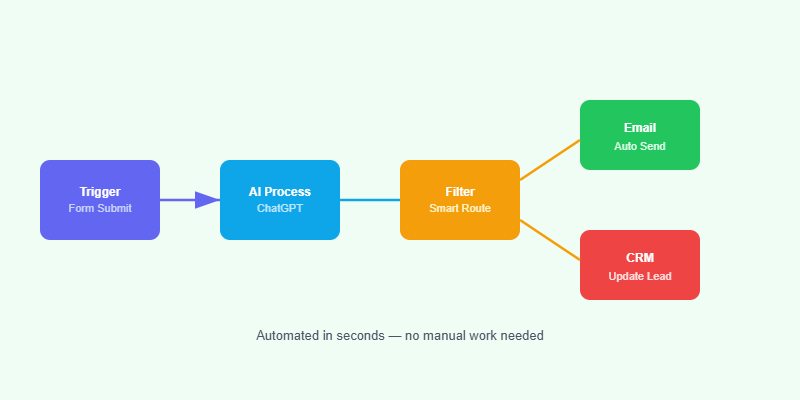
When a contact form submission arrives, trigger an automated email sequence that sends a personalised reply within two minutes, a case study on day two, and a call-to-action on day five. Tools: Make.com + Gmail + ChatGPT for personalisation.
2. AI-Powered FAQ Chatbot on Your Website
Train a chatbot on your product pages, pricing, and FAQs. It handles 80 percent of inbound questions around the clock, frees you for complex queries, and captures contact details from visitors who want more. Tools: Tidio, Intercom, or a custom WordPress chatbot.
3. Social Media Scheduling from One Master Sheet
Write your posts for the week in a Google Sheet. An automation reads each row, generates image captions with AI, and schedules them to Instagram, LinkedIn, and Facebook. Tools: Make.com + Buffer + OpenAI API.
4. Invoice and Payment Reminders
Connect your invoicing tool to an automation that sends a polite reminder three days before the due date, another on the due date, and a firmer one a week later — all personalised with the client’s name and invoice amount. Tools: Xero or QuickBooks + Make.com.
5. Review Request After Service Delivery
Tag a job as complete in your CRM and trigger a message that asks the client for a Google or Trustpilot review. Time it for 48 hours after delivery when satisfaction is still fresh. Tools: HubSpot or Pipedrive + Make.com.
6. Automatic Meeting Notes and Action Items
Record every client call and let AI transcribe it, extract action items, and send a follow-up email to both parties within ten minutes of hanging up. Tools: Otter.ai or Fireflies + Make.com.
7. Content Repurposing Pipeline
Write one long-form blog post per week. An automation turns it into three LinkedIn posts, a Twitter thread, a short video script, and a newsletter section — multiplying your reach without multiplying your writing time. Tools: Make.com + OpenAI.
8. Inventory or Stock Alert System
Monitor your WooCommerce or Shopify store for low stock. When any product drops below a threshold, send a Slack or WhatsApp alert to the right person with the product name, current stock, and a direct reorder link. Tools: Make.com + WooCommerce API.
9. Automated Proposal Generation
Fill in a short form with the client’s name, industry, and project type. An automation generates a branded proposal draft using a template and AI, ready for your review in under two minutes. Tools: Make.com + Google Docs + OpenAI.
10. Weekly Performance Report
Pull data from Google Analytics, your CRM, and your accounts tool every Monday morning, summarise it with AI, and email it to your inbox — a full business snapshot before you start your week. Tools: Make.com + Google Analytics API + OpenAI.
How to Get Started with AI Automation
Start with one workflow, not ten. Pick the task that wastes the most time each week — usually follow-up emails or scheduling — and automate that first. Once it runs reliably for two weeks, add a second workflow. Trying to automate everything at once leads to broken automations and no time to fix them.
Need Help Setting Up AI Automation?
Softnexis Technologies builds custom automation workflows for small businesses across the UK, US, and Pakistan. Tell us what you need automated and we’ll scope it in a free consultation.
Ready to Start Your Project?
Softnexis Technologies builds fast WordPress websites and AI automation solutions. Let’s talk about your goals.
AI automation: frequently asked questions
How much does AI automation for small businesses cost?
Many workflows run on tools costing under $30 a month, so AI automation often pays for itself in saved hours within a few weeks.
Do I need a developer for AI automation?
Not for simple workflows. Complex integrations benefit from an expert who keeps your data safe and the automations reliable.
Further reading
For research on AI adoption, see the McKinsey State of AI report.



